Fix Black Screen Recording (Windows 10/11)
If your recording shows a black screen (in a browser, app, or game), this guide helps you identify whether it’s a settings issue or a protected-content limitation.
Last updated: 2026-03-11 · Applies to Windows 10/11
Quick answer (fastest fixes)
Try these in order — they solve most “black screen” cases in normal apps.
Switch capture mode
- Try Window capture instead of Fullscreen.
- If Window fails, try Area capture.
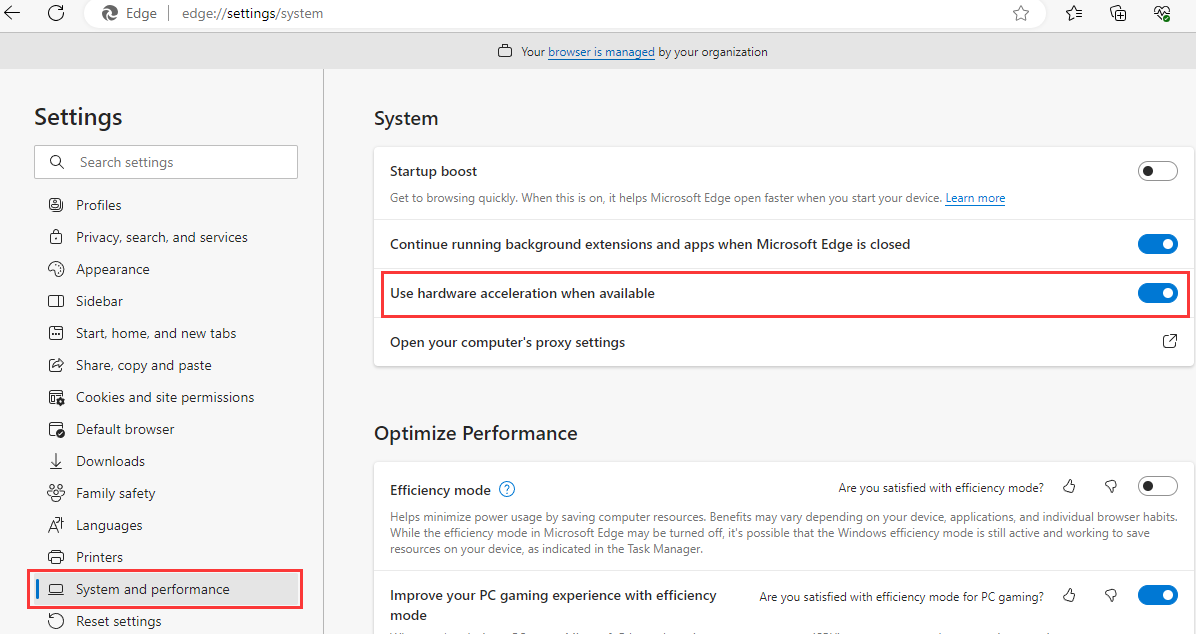
Browser? Toggle hardware acceleration
- Chrome/Edge Settings → System → disable hardware acceleration.
- Restart the browser, then record again.
Restart after changes
- Close the recorder completely and reopen.
- Re-select the target window/app before recording.
First: is it protected content (DRM)?
Some black screens are expected and not fixable.
If the black screen happens when recording a streaming service or protected video, it may be blocked by DRM/capture protection. In that case, most recorders will show black by design.
- Symptom: UI records, but the video area is black.
- What to do: Record only content you have rights to, or use allowed offline download options.
- Good news: If normal apps (PowerPoint, browsers, desktop apps) are black, it’s usually fixable.
Step-by-step fixes (Windows 10/11)
Start at the top; stop once the preview and final file both look correct.
Try Window capture for desktop apps
Many recorders work best with Window capture for apps. Fullscreen capture can fail in certain GPU/overlay scenarios.
Browser recording: disable hardware acceleration
In Chrome/Edge, turning off hardware acceleration often fixes black screen capture for tabs and videos (where allowed).
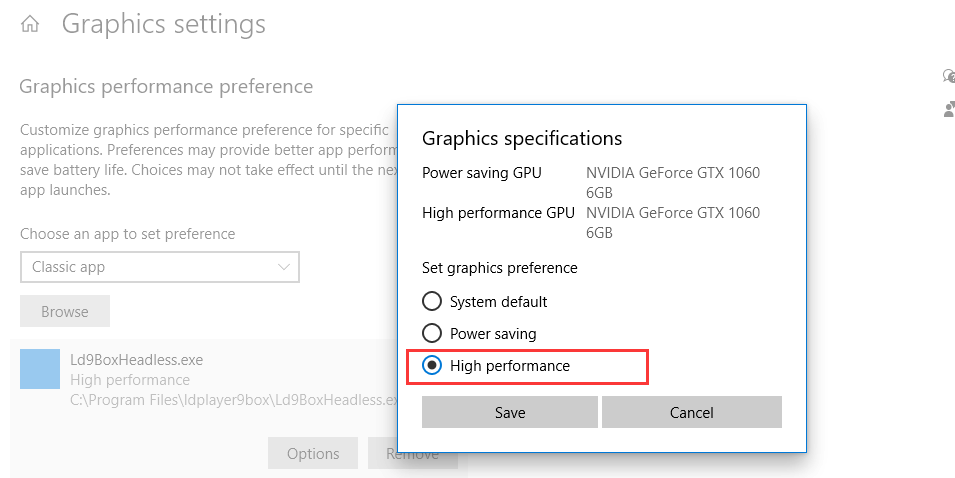
GPU switching: force the app to use the right GPU
Windows Settings → System → Display → Graphics: set the target app to High performance (or try Power saving) and test again.
If your recording is fine but has no sound
Use the dedicated guide: No sound in screen recording (Windows 10/11).
FAQ
Short answers for common black screen scenarios.
- Is black screen always fixable? Not always. DRM/protected video may be blocked by design.
- Why does the app show but video area is black? Protected video overlays and browser acceleration are common causes.
- What capture mode is most reliable? For desktop apps, Window capture is often the most reliable starting point.
Try Videoradius Screen Recorder
Record screen on Windows 10/11 with beginner-friendly capture modes and stable defaults.
Compatible with Windows 10/11 · 30-day money-back guarantee